创建
1. canvas正确绘制时,标签内容会被忽略 不能在css中定大小
1 | <canvas id="canvas" width="800" height="600" style="border: 1px solid red;"> |
2. 判断当前浏览器
1 | window.onload= function(){ |
3. 设置画布大小不需要px
1 | canvas.width=1024 |
4. 画路径:.colsePath不是封闭路径时 会自动封闭
1.begin 重新规划
2.close 自动封闭
3..arc(圆心坐标x,y,半径r,开始弧度起始点,结束弧度起始点,是否逆时针false)1
2
3
4
5
6
7
8for(var i = 0;i<10;i++){
context.beginPath()
context.arc(50+i*100,60,40,0,2*Math.PI*(i+1)/10)
//只使用beginPath不使用closePath就不会有封闭线段
context.closePath()
context.stroke()
//下一次.bgeinPath会重新规划路径
}

5. context.fill()会把边框内测一半像素覆盖,fill写在路径和stroke中间
1 | context.arc(50+i*100,60,40,0,2*Math.PI*(i+1)/10) |
6. 矩形
- 路径:
.rect(左上角坐标x,y,width,height) - 直接绘制: 填充、边框
.fillRect(x,y,width,height).strokeRect(x,y,width,height)
7. 线条两端属性lineCap
context.lineCap="round" 超出原来的长度的部分是圆形context.lineCap="squre"
8. 画星 5个角,一个角隔72° 大圆半径300,小圆半径150
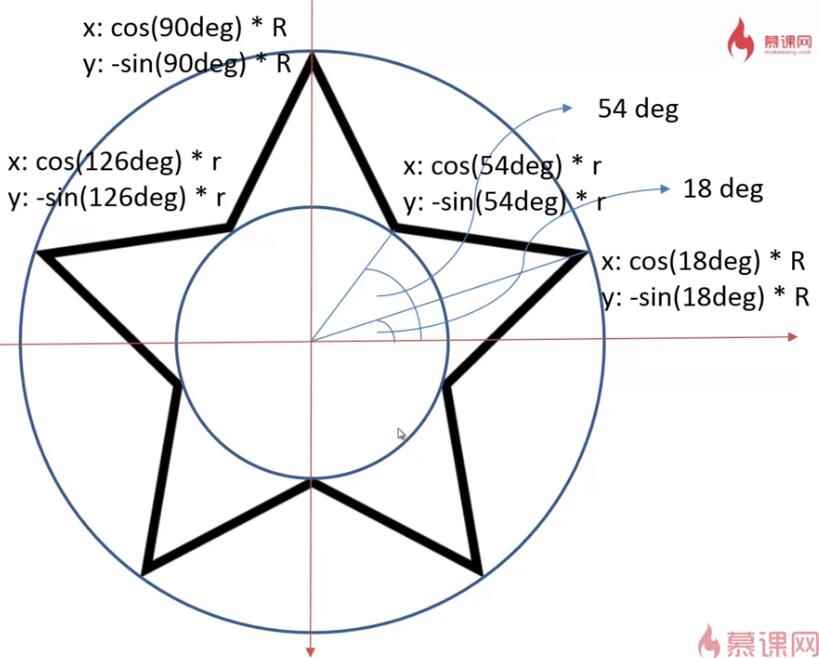
1
2
3
4
5
6
7
8
9context.beginPath()
for(var i =0;i<5;i++){
context.lineTo(x=Math.cos((18+i*72)/180*Math.PI)*300+400,
y=-Math.sin((18+i*72)/180*Math.PI)*300+400)
context.lineTo(x=Math.cos((54+i*72)/180*Math.PI)*150+400,
y=-Math.sin((54+i*72)/180*Math.PI)*150+400)
}
context.stroke()
context.closePath()
9. lineJoin 线段连接处
bevel线条顶端不会衍生自然形成尖角,形成纸带折叠效果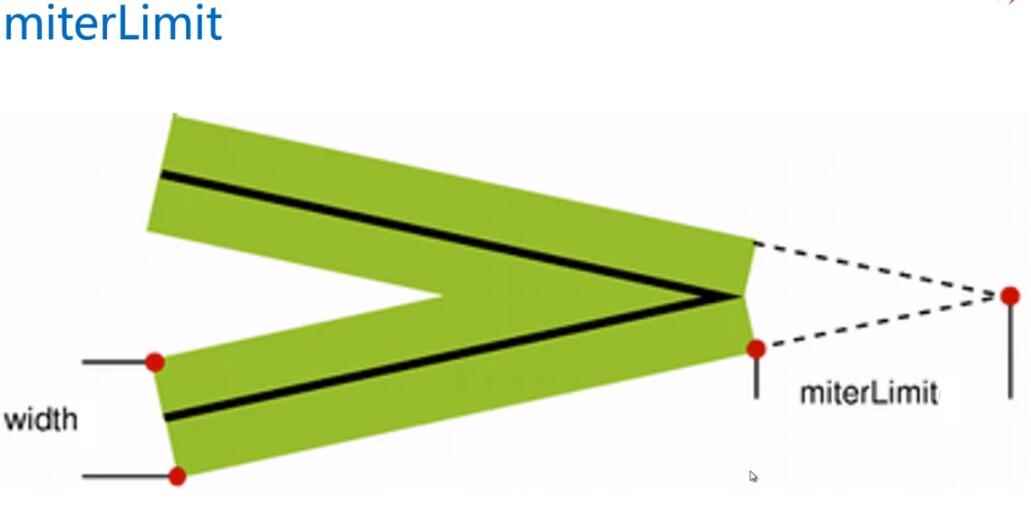
context.lineJoin="miter"
context.miterLimit=0.01
内角和外角的最大值。超过则使用bevel显示
10. 保存绘图状态,图形变换时
1 | context.save() |
11. 与鼠标事件交互 down up out move
1 | var isMouseDown = false |
preventDefault在pc端作用不大,移动端和键盘操作
例如:小游戏中的角色运动:上下,同时是浏览器上下移动翻页操作
1. 转换鼠标位置为相对canvas内的位置
1 | function window2canvas(x,y){ |
2. 鼠标移动在canvas上画
onmousemove执行频繁只要绘制直线就能达到曲线- 设置变量记录上一个位置
var lastLoc = {x:0,y:0} down时记录lastloc,move记录currentloc1
2
3context.moveTo(lastLoc.x,lastLoc.y)
context.lineTo(curloc.x,curloc.y) //context.stroke()
lastLoc = curloc平滑移动
1
2context.lineCap = "round"
context.lineJoin = "round"笔压:速度 = 距离/时间
距离
1
2function calculateDistance(loc1,loc2) {
return Math.sqrt((loc1.x-loc2.x)*(loc1.x-loc2.x)+(loc1.y-loc2.y)*(loc1.y-loc2.y))}时间
var lastTimestamp =0- mouseover:
var curstamp = new Date().getTime()var timedif = curstamp-lastTimestamp - 宽度
1
2
3
4
5
6
7
8
9
10
11
12
13
14
15
16
17function calLineWidth(t,s) {
var width
var speed = s/t
//1. 速度最小,宽度最大
if(speed<=0.1)
width= MAXWIDTH
//2. 速度很大,宽度最小
else if (speed>10) width = 1
//3. 中间宽度:(当前速度-最小速度)/(最大速度-最小速度)*宽度取值范围
else width = MAXWIDTH- (speed-0.1)/(10-0.1)*(MAXWIDTH-1)
console.log(width)
if (lastWidth==-1)
return width
else width = lastWidth*4/5+width*1/5
lastWidth = width
return width
}
清除画布
context.clearRect(0,0,canvasWidth,canvasHeight)
12. 移动端自适应
1 | <meta name="viewport" |
13. 触控touch时间 start move end
touch = e.touchs[0]从多点触控TouchList中获取touch
clientX/Y->Y:568
pageX/Y->Y:650将 e.x/y封装到point.x/y
1
2
3
4
5
6
7canvas.addEventListener("touchmove",function(e){
e.preventDefault()
if(isMouseDown)
touch = e.touches[0]
moveStroke({x:touch.pageX,y:touch.pageY})
})